“Did anyone do that?”
Daily jobs get forgotten, delayed or passed between shifts. It’s hard to tell who owns the next step.
Make responsibility visible.Put recurring work, assigned tasks and completion status in one place.
Know what’s done. Who’s read it.
And what still needs attention.
Bring tasks, team communication and QSPP requirements into one connected view. Prepare for assessment and help maintain your accreditation through everyday pharmacy operations.
Built around the everyday work of community pharmacy.
Paper checklists, verbal instructions and scattered records leave managers doing the chasing. Give the work a clear owner—and make progress visible.
Daily jobs get forgotten, delayed or passed between shifts. It’s hard to tell who owns the next step.
A notice on the wall or a quick conversation doesn’t tell you who actually received the message.
Preparing for assessment is harder when requirements, procedures and supporting records sit apart.
Prepare for assessment and keep your quality systems active throughout the accreditation cycle. Connect requirements with procedures, recurring tasks, staff training and supporting records, so you can see what’s covered and what needs attention.
Example preparation area
See the linked controls behind a readiness indicator, so your team can decide what to review next.
Illustrative workflow. Your pharmacy remains responsible for assessing the adequacy of its controls and evidence.
The training matrix brings staff and training requirements together. Spot gaps, expiring records and items awaiting sign-off, then focus on the follow-up.
Give your team a direct route to the checklist or procedure they need. Place a QR label at the workstation, fridge or equipment where the work takes place.
Choose the checklist or procedure the QR code opens.
Print the label and stick it where the job happens. Staff scan the code to open the linked checklist or procedure.
Change what the code opens at any time without reprinting or replacing the label.
 Opening checklist
 SCAN TO OPEN · DEMO
Point your phone camera at this demo QR code to open the example opening checklist on this website.
Open demo checklist →Example only. No live pharmacy records are changed. Access to this website is required.
Update the destination in StoreOps as your pharmacy’s checklists and procedures change.
Try the examples below. See how task completion, notice acknowledgements and quality reviews fit into the pharmacy day.
Interactive examples · Sample data only · No changes to your live app
Give staff a clear starting point and managers a practical way to see what needs their attention.
Bring repeatable pharmacy work into a shared task system, with responsibility, timing and completion visibility.
Share instructions with the team. See who has acknowledged them, who is outstanding and when responses were recorded.
Keep procedures accessible and connect them to the requirements they support. See their status within your QSPP readiness view.
Understand staff training currency, gaps and upcoming expiries, with training controls linked to relevant requirements.
Bring incident and risk registers into your quality systems, alongside dedicated evidence and readings areas.
Use completion information, read reports and readiness statuses to focus follow-up where it matters.
StoreOps began with pharmacy operators looking for a better way to communicate daily work and receive feedback on completion. That practical problem remains at the heart of storeops.app: clearer responsibilities, visible follow-through and quality systems connected to everyday operations.
Choose a shared database, your own Australian cloud database, or a managed server on your local pharmacy network.
Get started with pharmacy operations and ongoing QSPP accreditation support on a shared database hosted in Australia.
A private database hosted in the cloud in Australia.
A managed server at your pharmacy. Your data stays on the local pharmacy network.
Use AI to help draft procedures and other content in StoreOps. AI is optional and charged separately if used. Your monthly hosting plan does not require AI.
Customise StoreOps. Adapt the existing StoreOps software to suit the way your pharmacy works. Available on Private Cloud and Onsite Managed Server at $50/hour ex GST.
Build a new private app. Managed Server customers can commission a separate, new app built exclusively for their pharmacy at $50/hour ex GST.
For both services, project hours are scoped before work begins.
Prices shown in AUD. Managed Server introductory offer duration and eligibility are confirmed before signup. GST treatment, installation/delivery charges and billing scope will be confirmed before signup. Plan selection prepares a summary; it does not start a subscription or collect payment.
Use LLMs through private apps built for your pharmacy, with security at the centre of the design. Your managed server brings your data, pharmacy workflows and private apps together on your local pharmacy network.
Managed Server customers can commission private apps that use large language models (LLMs) to support their pharmacy’s workflows. New private apps are built exclusively for your pharmacy at $50/hour ex GST, with project hours scoped before work begins.
The model, hosting, access permissions and data-sharing requirements are agreed as part of the app’s scope. Where an external LLM is used, data sent to that provider leaves your local pharmacy network. Local model options depend on the workload and hardware.
Choose a new HP device or send our technical team a compatible refurbished HP Elite Mini. Your managed server uses encrypted storage and a controlled support process.
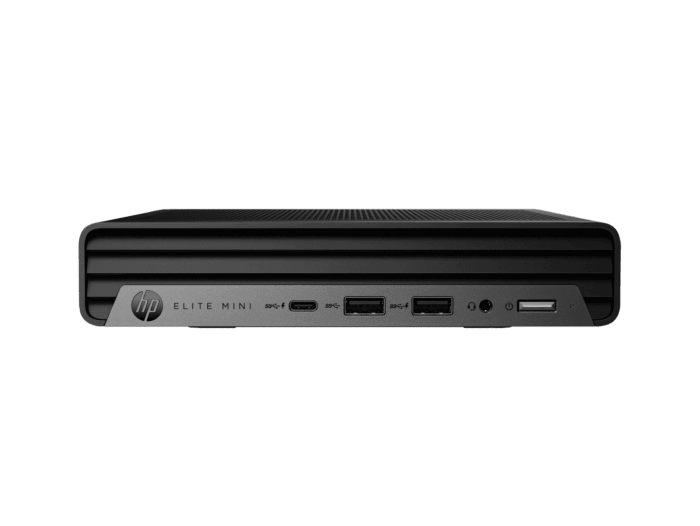
New device for your Onsite Managed Server setup. Hardware is separate from the managed service: $45.95 AUD/month introductory pricing, with a standard price of $99.95 AUD/month.
Product image from HP. GST treatment, installation and delivery charges are confirmed before ordering.
We only accept HP Elite Mini devices. Ship a compatible refurbished HP Elite Mini to our technical team. We install the software and return the configured device to your pharmacy.
Confirm HP Elite Mini model compatibility and shipping arrangements with our technical team before sending it. Installation and return-shipping costs are scoped before proceeding.
Data stored on the managed server is encrypted to help protect it against unauthorised access. TPM 2.0 and a chassis tamper switch are required for the managed configuration.
Once the device enclosure is opened, the server must be returned to our technical support team for a rebuild before it returns to service. Do not open the device, replace components or attempt a repair yourself. Contact support to arrange the return and recovery process.
For pharmacy owners, area managers and head-office teams overseeing multiple stores. Compare performance, coordinate group-wide work and identify which pharmacies need support. Available only with Onsite Managed Server.
Review on-time completion, overdue work, blocked tasks and daily trends. Choose your date range and store scope.
Send head-office tasks to stores and follow live progress. Filter by status, spot overdue occurrences and see which stores have completed the work.
Access the requirement register, store readiness, training, evidence and assessment-pack views from head office.
See blocked work, recorded explanations and next steps. Identify the tasks that repeatedly miss their due time.
Review recorded task completions and on-time activity to understand where work is moving and where follow-up is needed.
Dedicated areas for notices, requests, procedures, training, onboarding, stores and logins support head-office coordination.
Head-office access is not available on Shared Database or Private Cloud. Group deployment and connectivity are scoped for your setup.
A paper checklist can tell you what should happen. Connected tasks and reports help you see completion and outstanding work, while notice acknowledgements show who has responded to team instructions.
The readiness view connects requirements with supporting controls, such as procedures, recurring tasks, training and registers. It identifies requirements shown as covered, needing attention or having no linked control. Recurring tasks, training records and procedure reviews help your team maintain its quality systems between assessments. These indicators support preparation and ongoing accreditation maintenance; they do not certify compliance.
Yes. Create a QR code, choose the checklist or procedure it opens, then print the label and place it where the job happens. You can change what the code opens at any time without reprinting the label.
Yes. The noticeboard displays individual acknowledgements, completion percentages and timestamps, with read-report controls for follow-up. Due dates and overdue indicators help keep time-sensitive messages visible.
No. storeops.app is independent software and is not affiliated with or endorsed by the official Quality and Safety Pharmacy Program or the Pharmacy Guild of Australia. For official requirements and assessment information, visit qspp.com.
No. Your pharmacy must review whether its controls and supporting evidence adequately meet the applicable requirements. Accreditation is determined through the formal assessment process, not a software status.
Yes. The Managed Server plan supports private apps designed to use LLMs for your pharmacy’s workflows. Model hosting, access permissions and data sharing are scoped before development. External LLM services receive the data sent to them; local model options depend on the workload and hardware. Private app development is $50 AUD/hour ex GST, with hours scoped before work begins.
Customisation adapts the existing StoreOps software to your pharmacy. A private app is a new, separate app built exclusively for your pharmacy. Private app development is available on the Onsite Managed Server plan at $50 AUD/hour ex GST, with project hours scoped before work begins.
AI is optional and charged separately if used. AI features, such as drafting procedures, use separately purchased StoreOps AI credits. Credit pricing and usage rates are confirmed before purchase. Alternatively, connect your own OpenAI or Anthropic API key; usage through your key is billed to your provider account instead of using StoreOps AI credits.
Shared Database is $10/month, Private Cloud is $39.95/month and Onsite Managed Server has introductory pricing of $45.95/month and a standard price of $99.95/month, in AUD. Introductory offer duration and eligibility are confirmed before signup. New HP hardware is $2,779 AUD, separate from the monthly managed service. You can also supply a compatible refurbished HP Elite Mini. Only HP Elite Mini devices are accepted. GST treatment, installation/delivery charges and billing scope are confirmed before signup.
Shared Database uses a shared database hosted in Australia. Private Cloud provides a private database hosted in the cloud in Australia. With Onsite Managed Server, data stays on your local pharmacy network.
The head-office app is available to pharmacy groups only on the Onsite Managed Server plan. It is not available on Shared Database or Private Cloud. Group deployment and connectivity are scoped for your setup.
Yes. We can customise the existing StoreOps software to suit your pharmacy’s needs on Private Cloud and Onsite Managed Server. Customisation is $50 AUD/hour ex GST, separate from your monthly plan. Project hours are scoped before work begins.
Yes. A custom domain option is available on Private Cloud and Onsite Managed Server.
Yes. The Onsite Managed Server plan includes a control panel for your managed server.
The StoreOps app marketplace is available on the Managed Server (Onsite Managed Server) plan.
No. This site prepares a requirements summary for review. It does not create a subscription or collect payment. Final scope and commercial terms are confirmed before signup.
Bring pharmacy operations and ongoing QSPP accreditation support together.